Physical Address
304 North Cardinal St.
Dorchester Center, MA 02124
Physical Address
304 North Cardinal St.
Dorchester Center, MA 02124
You might not realize it, but your Wi-Fi network — your SSID — could be broadcasting information about you to the world! For example, a name like SmithFamilyWiFi at home, or for a business: coffeeshop-pos or ABCCompany-VoIP, can reveal more than you think.
In this blog, I’m going to show you what your SSID is really saying and how to make it safer — without breaking your network.
Is your SSID being transmitted all over the world? Not exactly. However there’s a good chance it’s already visible online.
Websites like WiGLE.net collect millions of SSIDs from “volunteers” who walk, drive, bike, or skateboard with Wi-Fi scanners. They log the network name (SSID), MAC addresses, and GPS coordinates.
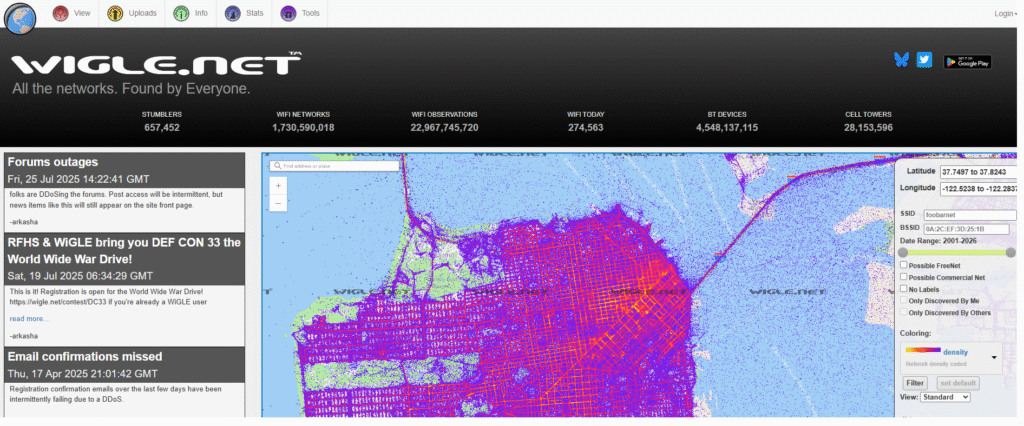
What does this mean to you?
For businesses, it’s fine to include your company name for guest networks. For example, bestpizza-guest works well. But do you want a potential hacker to know which SSID your POS is on? Names like bestpizza-pos could give attackers a roadmap to your critical networks. That could mean denial-of-service attacks that stop you from taking payments. Operational security is all about not revealing what a hacker should target.
SSID stands for Service Set Identifier — basically the name of your Wi-Fi network. Think of it like a Windows Workgroup name if you remember those.
Greybeard ≠ greybeard.Wondering if hiding your SSID will help? Short answer: it won’t. More on that in another post!
Some SSIDs tell the world too much. Examples include:
Personal / Family Names:
SmithFamilyWiFiBailey's HouseJohnny's Wi-FiBusiness Networks:
XYZ-POS123corp-privateOurBusiness-secureDrOffice-medicaldevicesLMNcorp-VoIPLocation Hints:
Apartment123123AnyStreetWiFiDefault Device SSIDs:
ASUS, DLink, NETGEAR, LinksysThese names can make it easier for someone to profile your home or business network, and for attackers to identify points of entry.
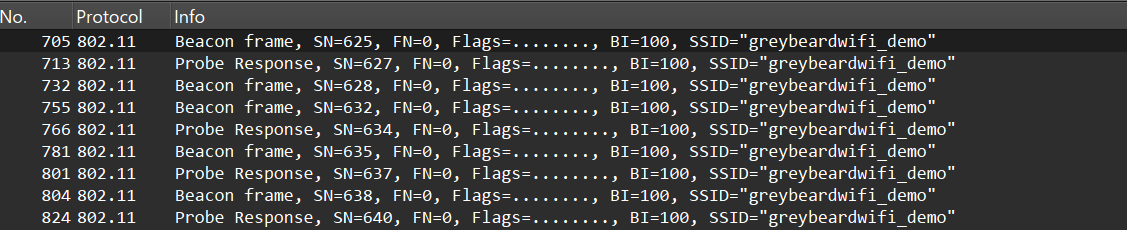
Robin, BlueSky, Snowflake, RaindropComeGetMe, Unhackable, IHate, IDareYouCafeNet-Guest, BookstoreWiFiRemember: hiding your SSID is not a reliable protection. Tools like Wireshark can still detect it.
Stay tuned to GreyBeard Wi-Fi for more tips and tricks to make your Wi-Fi better! We’ll cover practical tutorials, network security advice, and tools to help you get the most out of your Wi-Fi.